Best Google Alerts Alternatives in 2026: 6 Compared (Free & Paid)
The best Google Alerts alternatives in 2026 are SnitchFeed (from $59/mo, real-time Reddit/X/LinkedIn/Bluesky monitoring with AI filtering), Brand24 (from $199/mo annual, broad multi-platform coverage including TikTok), and Talkwalker Alerts (free, web and news only, no social). Google Alerts is free and a reasonable starting point, but it only indexes news and blogs; it has no access to Reddit, LinkedIn, or Twitter/X, where most real-time B2B conversations happen.
This guide covers where Google Alerts actually fails, the best keyword monitoring alternatives for every budget and use case, and how to migrate away from it without losing your coverage.
All competitor pricing below was checked against each vendor's own pricing page in September 2026. Prices change; if you spot something out of date, tell us and we will fix it.
Quick comparison: Google Alerts vs social listening tools
| Feature | Google Alerts | Tools like SnitchFeed |
|---|---|---|
| Real-time monitoring | ❌ | ✅ |
| Reddit tracking | ❌ | ✅ |
| LinkedIn monitoring | ❌ | ✅ |
| Twitter/X coverage | ❌ | ✅ |
| Bluesky support | ❌ | ✅ |
| AI-powered filtering | ❌ | ✅ |
| Slack / Discord / Webhook | ❌ | ✅ |
| News & blog tracking | ✅ | ✅ |
| Free | ✅ | ❌ (free trial) |
How to set up Google Alerts
Setting one up takes about a minute: go to google.com/alerts, enter your keyword (in quotation marks for an exact match), open Show options to set the frequency and sources, then click Create Alert.
The options panel is where the useful settings live: How often controls delivery (as-it-happens, once a day, or once a week), Sources narrows to news, blogs, web, video, books, discussions or finance, and How many switches between "Only the best results" and "All results". Choose "All results" if you are monitoring a brand name and cannot afford to miss anything.
Where Google Alerts falls short
It misses where conversations actually happen
Google Alerts is biased toward indexed web pages — news, blogs, press releases. It does not monitor LinkedIn posts, Twitter threads, Reddit discussions, or Bluesky. For B2B startups, this is a major blind spot.
Reddit alone has hundreds of niche subreddits where your target audience asks questions, shares pain points, and looks for solutions. If someone posts "looking for a better project management tool than Asana" in r/startups, Google Alerts won't tell you until the thread is long dead — if it catches it at all. By the time Google indexes that page, the conversation has moved on.
LinkedIn is similarly invisible to Google Alerts. High-intent posts like "what's everyone using for X" or "we're switching away from [competitor]" happen there constantly — and none of it shows up in your inbox.
It's not real-time
"As-it-happens" sounds fast, but it's not. Google needs to crawl, index, and process content before it reaches you — that typically means hours, sometimes a full day. In a high-intent Reddit thread where the first reply gets the most engagement, being second costs you the deal.
For crisis management, the delay is even more damaging. By the time a negative mention shows up in Google Alerts, it may have already spread across platforms and accumulated replies.
The signal-to-noise ratio is poor
Google Alerts has no filtering intelligence. If your startup is called "Summit," you'll wade through hiking blogs and conference recaps. There's no way to prioritize high-intent mentions over noise — you get everything dumped into your inbox with no ranking or scoring.
This gets worse as you add more keywords. Beyond 10–15 alerts, the email volume becomes hard to manage, and the good signals get buried.
No workflow integration
Google Alerts sends an email. That's it. You can't route mentions to Slack, trigger a webhook, or create a CRM task automatically. For a growth team trying to move fast, every mention requires a manual copy-paste step to do anything useful with it.
Can you use Google Alerts for brand mentions?
Yes, but only partially. Google Alerts will catch your brand name when it appears in indexed news articles, blog posts, and other crawlable web pages, which makes it a reasonable free baseline for press coverage and SEO-indexed content. What it misses is most of the conversation that actually matters for brand monitoring: Reddit threads, X/Twitter posts, LinkedIn discussions, and other social content that Google doesn't reliably index, if it indexes it at all. A customer complaint or a competitor comparison thread on Reddit can run for days without ever surfacing in a Google Alert.
If your brand gets talked about primarily in social spaces rather than news and blogs, treat Google Alerts as a supplement, not your primary brand monitoring tool. Use it for the news/web layer, and pair it with a tool that covers social platforms directly, see Best Brand Monitoring Tools in 2026 for options built specifically for that layer.
Google Alerts for social media
Google Alerts has no direct social media monitoring. It doesn't connect to Reddit's, X's, or LinkedIn's APIs, and it only picks up social content indirectly, and inconsistently, when a page happens to get crawled and indexed by Google. If you're trying to use Google Alerts for social media monitoring specifically, expect large gaps in coverage and significant delay on anything it does catch. A dedicated tool with direct platform access (SnitchFeed for Reddit, X, LinkedIn, Bluesky and Hacker News; see the options above) is the reliable way to cover social conversation.
Is Google Alerts enough for your stage?
Pre-product / very early stage: Probably fine. Mention volume is low and you mostly need news and blog coverage. Save the tool budget for something else.
Approaching PMF: Not enough. Speed matters when you're trying to catch buyer intent on Reddit or LinkedIn before a thread goes cold. A 24-hour delay kills the opportunity.
Post-PMF, competitive market: You need real-time monitoring. In competitive SaaS categories, conversations move quickly and Google Alerts often surfaces things long after the window has closed.
LinkedIn, Reddit, or Twitter is your primary GTM channel: Google Alerts offers zero coverage here. If your ICP hangs out on social platforms, the tool is essentially useless for GTM purposes.
Tracking 10+ keywords: Filtering becomes essential. Without prioritization or scoring, you'll spend more time sorting junk than acting on real signals.
Top 6 Google Alerts alternatives in 2026
1. SnitchFeed
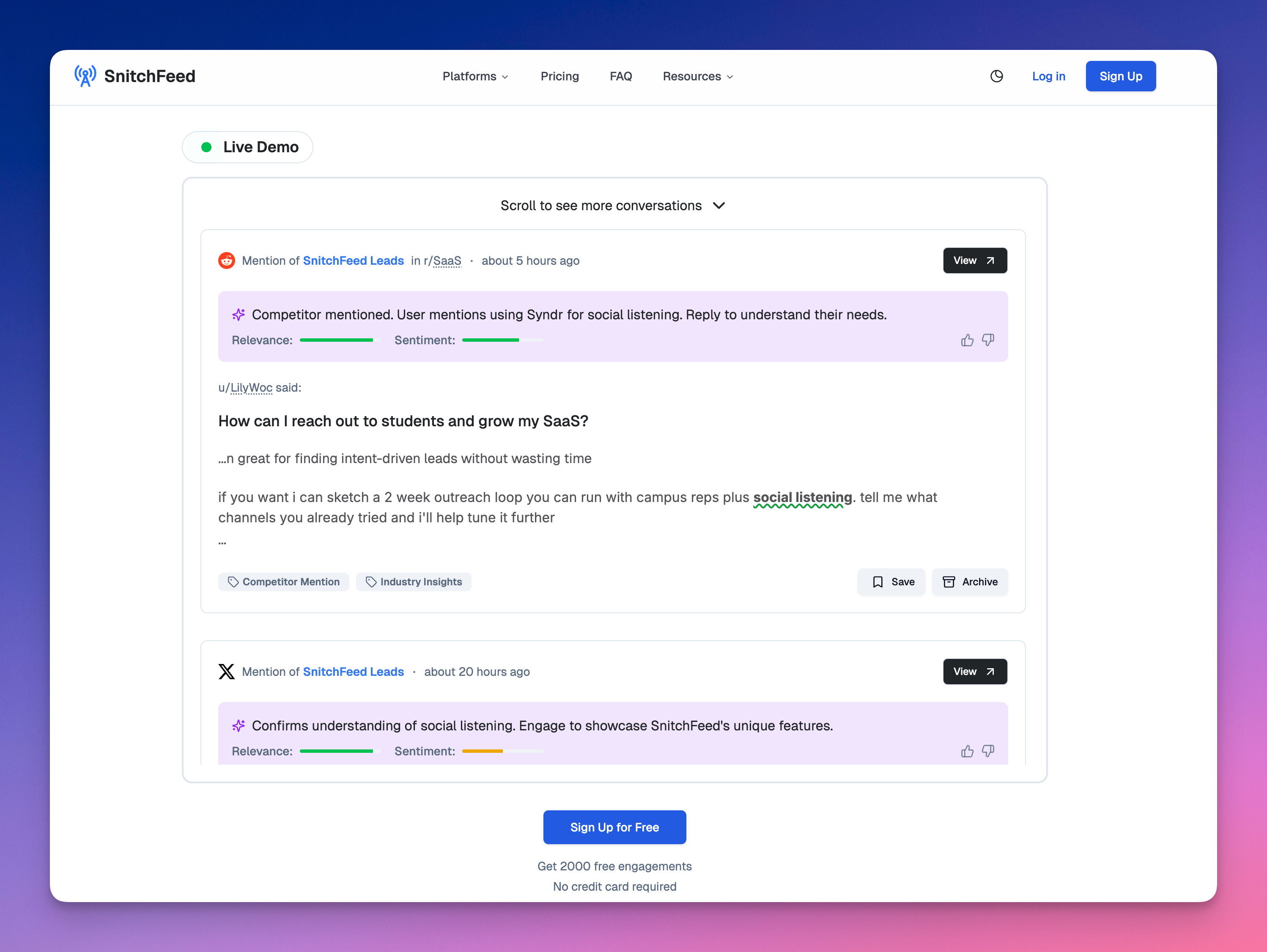
SnitchFeed is purpose-built for the gap Google Alerts leaves: real-time monitoring of the platforms where startup audiences actually talk (see the Reddit, X/Twitter, and LinkedIn monitoring pages for platform specifics). While Google Alerts watches for indexed web pages, SnitchFeed watches Reddit, X/Twitter, LinkedIn, Bluesky and Hacker News, surfacing Reddit and Bluesky mentions within seconds rather than hours.
The core difference is what happens after a mention is detected. Google Alerts sends you everything and lets you figure out what matters. SnitchFeed scores each mention for relevance and sentiment using AI, so your feed shows the high-signal conversations first. If someone posts "what's a good alternative to [competitor]?" on Reddit, SnitchFeed flags it as high-relevance immediately. If someone posts a generic article that tangentially mentions a keyword you're tracking, it gets filtered down.
What it does well:
- Reddit and Bluesky monitoring in near real-time (seconds)
- LinkedIn, Twitter/X and Hacker News coverage, refreshed hourly, with AI-powered relevance scoring
- Clean, low-noise mention feed — you see what actually matters
- Alerts routed to Slack, Discord, email, or webhooks so mentions land where your team works
- Zapier integration for automating downstream actions (create a HubSpot task, log to a sheet, ping a channel)
- CSV export and team roles for multi-person workflows
Where it fits vs. alternatives: SnitchFeed sits between free tools like Talkwalker Alerts (no social) and heavier suites like Brand24 or Mention (expensive, complex). For teams whose ICP is on Reddit, LinkedIn, or Twitter, it covers the channels that matter most at a price that makes sense for startups.
Pricing: Starter $59/mo (or $47/mo billed annually). Pro $119/mo (or $95/mo billed annually). 7-day free trial, no credit card required.
Honest limitations: SnitchFeed doesn't cover Facebook, TikTok, or Instagram. If those platforms are central to your GTM, you'll need to supplement. It's also not a full social media management suite — it's a listening and alerting tool, not a publishing or scheduling platform.
Best for: Startups, SaaS growth teams, and GTM teams that need real-time coverage of Reddit, LinkedIn, Twitter, Bluesky and Hacker News without the overhead or cost of an enterprise suite.
2. Mention
Mention has been in the media monitoring space since 2012 and has grown into a full-featured platform covering 1B+ sources across social, news, blogs, forums, and review sites.
Where it stands out is in its historical data and reporting depth. You can pull mentions up to 2 years back, filter by sentiment, language, country, and source type, and export everything for reporting. It also has a team-oriented workflow — you can assign mentions to teammates, add notes, and track response status — which makes it useful for agencies managing clients or teams with a defined social response process.
What it does well:
- Broad source coverage: web, news, Twitter, Instagram, Facebook, Reddit, and more
- Up to 2 years of historical data on paid plans
- Strong filtering: by sentiment, language, country, source, and keyword
- Team collaboration tools — assignment, notes, response tracking
- Clean dashboard with trend graphs and share-of-voice metrics
Where it fits vs. alternatives: Mention is more capable than SnitchFeed in terms of platform breadth and reporting, but also more expensive and takes longer to get value from. It's a better fit for teams that need structured workflows around social monitoring rather than fast, lean alerting.
Pricing: No public pricing. Mention has moved off self-serve entirely: its pricing page now shows a single demo-gated "Company Plan" with no figures attached, so you have to book a call to get a number. Annual billing is advertised as two months free.
Honest limitations: There is no way to find out what it costs without talking to sales, which is a real barrier if you are just comparing options. The UI can be overwhelming to set up, and real-time isn't always truly real-time, as some sources lag.
Best for: Marketing teams and agencies that need comprehensive multi-platform monitoring with historical data, structured workflows, and regular reporting.
3. Talkwalker Alerts (Free)
Talkwalker Alerts is the answer to "I want Google Alerts but better, still for free." It monitors web, news, blogs, and forums and delivers results via email or RSS. Setup takes two minutes and it requires no account at all — just enter a keyword and an email address.
In practice, it catches more than Google Alerts does. It's faster (alerts typically arrive within an hour rather than a day), its indexing is less US-centric, and it tends to surface forum posts and niche sites that Google Alerts misses. It also supports Boolean operators, so you can write queries like SnitchFeed OR "social listening tool" to widen coverage.
What it does well:
- Free, no account required
- Faster delivery than Google Alerts
- Better coverage of forums, niche sites, and international sources
- RSS output (useful for piping into feed readers or Zapier)
- Simple Boolean operators
Where it fits vs. alternatives: Talkwalker Alerts is purely for web/news monitoring. It has the same fundamental limitation as Google Alerts: zero social platform coverage. Think of it as a direct upgrade to Google Alerts for the specific use case of tracking news and blog mentions, not a replacement for a proper social listening tool.
Pricing: Free. No paid tier. Talkwalker's paid product (Talkwalker Consumer Intelligence) is a separate, enterprise-grade platform on quote-only annual contracts, with reported deals commonly starting around $25,000/year and running into six figures at scale.
Honest limitations: No dashboard, no filtering by source type or sentiment, no team features, and no social platforms at all. It's powerful for what it does, but what it does is narrow.
Best for: Founders or small teams who want better-than-Google-Alerts web monitoring at $0, and whose audience isn't primarily on social platforms.
4. Brand24
Brand24 is one of the most widely used social listening tools, particularly among PR teams and agencies. It covers a wide range of sources — Twitter, Instagram, Facebook, TikTok, LinkedIn, Reddit, news, blogs, forums, YouTube, podcasts, and review sites — and surfaces mentions in near real-time.
Beyond raw mention tracking, Brand24 adds analytical depth: sentiment scoring, influencer identification (showing which accounts drive the most reach around your keywords), share of voice over time, and an AI-generated "presence score" that benchmarks your brand against competitors. Reports can be exported as PDFs or scheduled for regular delivery.
What it does well:
- Very broad source coverage including TikTok, podcasts, YouTube, and review sites
- Influencer scoring — see which accounts are amplifying your keywords
- Sentiment analysis with trend graphs over time
- Competitor comparison (track multiple brands in one view)
- Automated PDF reports for client or stakeholder delivery
- Mobile app for on-the-go monitoring
Where it fits vs. alternatives: Brand24 covers more sources than SnitchFeed and has stronger analytics and reporting. The tradeoff is price and complexity — it takes more time to set up meaningfully and costs more. For teams that need Instagram and TikTok coverage alongside Reddit and LinkedIn, Brand24 is the more complete solution.
Pricing: Individual $249/mo ($199 billed annually), Team $349 ($299), Pro $499 ($399), Business $699 ($599), and Enterprise from $1,499/mo on annual billing. Free 14-day trial. Note that the entry tier covers 3 keywords and 2,000 mentions a month with a single user.
Honest limitations: Mention volume caps on lower tiers can be limiting for high-volume keywords. The interface is feature-dense and takes time to learn. LinkedIn coverage can be inconsistent depending on privacy settings.
Best for: PR teams, marketing agencies, and established brands that need comprehensive multi-platform monitoring with strong reporting and client-ready exports.
5. Sprout Social (+ Listening)
Sprout Social is primarily a social media management platform — scheduling, publishing, engagement, analytics — with a Listening add-on that handles keyword and brand monitoring across Twitter, Instagram, Facebook, LinkedIn, Reddit, and YouTube.
The reason to consider Sprout for monitoring isn't because it's the best standalone listening tool — it isn't. It's because if your team is already using Sprout to publish and engage, adding Listening keeps everything in one place. You can move from spotting a mention in the Listening feed to drafting a reply in the same tool without switching context.
What it does well:
- Tight integration with publishing and engagement workflows if you're already on Sprout
- Cross-channel analytics — listening data alongside your organic performance data
- Topic-level insights (not just keyword mentions, but theme clustering)
- Team features — assign, collaborate, track response times
Where it fits vs. alternatives: Sprout makes sense only if you're already a Sprout Social customer. As a standalone monitoring solution, it's significantly overpriced compared to dedicated tools like SnitchFeed or Brand24.
Pricing: Essentials is $79/seat/mo billed annually ($99 monthly), then Standard $199, Professional $299 and Advanced $399 per seat. Listening is an add-on available on Standard and above, and its price is not published, so the combined cost needs a sales conversation.
Honest limitations: Listening requires a separate add-on purchase, there's no self-serve pricing, and the overall cost is high relative to monitoring-only tools. Not worth adopting just for listening.
Best for: Teams already using Sprout Social that want to consolidate social management and listening into one platform.
6. Determ
Determ is a media monitoring platform that leans into AI-generated outputs. Its standout feature is Synthia, an AI assistant that summarizes your mention data, drafts reports, identifies trends, and answers questions like "what's the sentiment around my brand this week?" without you having to build the analysis yourself.
Determ covers a wide range of sources — social platforms, news, blogs, forums, TV, radio, and print — and delivers alerts via email, Slack, or mobile app. It's positioned between Brand24 and enterprise platforms like Meltwater in terms of scope and price.
What it does well:
- Synthia AI for automated summaries, trend analysis, and report drafting
- Broad source coverage including TV, radio, and print (useful for PR teams)
- Mobile-first alert delivery (iOS and Android app)
- Influencer identification and reach scoring
- White-label reports for agencies
Where it fits vs. alternatives: Determ is closest to Brand24 in terms of positioning but differentiates on AI-generated reporting. If your team spends significant time preparing monitoring reports for stakeholders, Synthia can eliminate hours of manual work per week.
Pricing: Public and cheaper than its positioning suggests. Focus is €99/mo, Expand €299/mo and Command €499/mo, each with two months off on annual billing, plus a quote-based Custom tier. All tiers include unlimited users, unlimited keywords and the full AI feature set. 5-day free trial, no card required.
Honest limitations: The entry tier covers a single topic and 1,000 mentions a month, so it gets expensive quickly if you track several brands or competitors. Pricing is in euros, which adds an exchange-rate wrinkle for US teams. The broadcast and print coverage is only worth paying for if you actually need it.
Best for: SMB to mid-market teams, agencies, and PR professionals that need AI-assisted reporting and broad media coverage including offline sources.
Full comparison table
| Tool | Starting price | Best for | Real-time | Platforms |
|---|---|---|---|---|
| SnitchFeed | $59/mo ($47 annually) | Startups, GTM teams | ✅ | Reddit, X, LinkedIn, Bluesky, Hacker News |
| Mention | No public pricing | Agencies, mid-market | ✅ | Twitter, Facebook, Instagram, Reddit, Web |
| Brand24 | $249/mo ($199 annually) | PR teams, enterprises | ✅ | Twitter, Facebook, Instagram, TikTok, Reddit, YouTube, Web |
| Determ | €99/mo | Mid-market, agencies | ✅ | Social, news, blogs, TV, radio, print |
| Talkwalker Alerts | Free | Individuals, small teams | ⚠ Delayed | Web + news/blogs only |
| Sprout Social | $79/seat/mo + Listening add-on | Teams already on Sprout | ✅ | Twitter, LinkedIn, Instagram, Facebook, Reddit |
Which one should you pick?
"I want Google Alerts but for Twitter, Reddit, LinkedIn, Bluesky and Hacker News." → SnitchFeed — AI noise filtering, startup-friendly pricing, real-time on Reddit and Bluesky.
"I need completely free." → Talkwalker Alerts — web and forums only, no social.
"We need Instagram and TikTok coverage too." → Brand24 — broadest source coverage at a reasonable price.
"We need to produce regular monitoring reports for clients or executives." → Determ for AI-generated reports from €99/mo, or Mention for structured workflows if you are willing to go through sales.
"We already use Sprout." → Sprout Social + Listening add-on.
"We're mid-market and want mature listening + collaboration features." → Mention.
How to migrate from Google Alerts to a new tool
Switching tools is less painful than most people expect, but doing it systematically avoids gaps in your monitoring coverage during the transition.
Step 1: Export and audit your current alerts
Google Alerts doesn't have a bulk export, so do this manually:
- Open google.com/alerts
- List every alert you have — keyword, frequency, and why you set it up
- Mark each one as: keep (actively useful), cut (noise, never acted on), or unsure
Most teams discover they have 20+ alerts and only 5–10 are actually delivering value. The migration is a good moment to clean up.
Step 2: Categorize your keywords by intent
Before importing into a new tool, group your keywords:
- Brand — your name, product, domain, common misspellings
- Competitors — their names + "[competitor] alternative" variants
- Buyer intent — "best [category]", "looking for [problem]", "recommendations for [use case]"
- Industry — category terms, trends, important figures
- Crisis — "[brand] AND scam/lawsuit/down"
This makes setup in the new tool faster and ensures you're not just copying noise.
Step 3: Set up your primary keyword listeners in the new tool
For SnitchFeed specifically:
- Start with your brand name and top competitor as your first two listeners
- Add your highest-intent buyer keywords ("[category] alternative", "looking for [tool type]")
- Set alert thresholds — for brand monitoring, set relevance to medium or high so you see everything; for broad category keywords, set it higher to filter noise
- Connect your Slack channel or email immediately so alerts land where your team is
For the first week, check your feed daily to calibrate relevance thresholds. Most tools let you mark mentions as relevant or not, which trains the AI over time.
Step 4: Run both tools in parallel for 1–2 weeks
Don't cancel Google Alerts on day one. Run them side by side for a week or two so you can:
- Verify the new tool is catching the things that matter
- Identify any source gaps (e.g. if you have a Google Alert specifically for a niche blog that the new tool doesn't cover)
- Confirm the alert cadence and routing is working as expected
Step 5: Keep Google Alerts for news and blogs, retire it for social
For most teams, the final state is: Google Alerts handles news and blog mentions (free, fine for that), while the new tool handles social platforms. You don't have to choose one or the other — they complement each other.
Cut any Google Alert that's now duplicated by your new tool. Keep the ones covering news sources and blogs where your new tool has no coverage.
FAQ
How often does Google Alerts actually update?
Not in real-time. Alerts are batched and typically sent within a few hours, but delays of 24–48 hours are common — especially for social content and fast-moving news. The "as-it-happens" setting is faster but still not instant; Google still needs to crawl and index the page first.
Why does Google Alerts miss so many mentions?
It only tracks content in Google's index — news, blogs, and some public web pages. It does not monitor LinkedIn, Twitter/X, Reddit, Facebook, forums, news behind paywalls, or app store reviews. For many B2B startup teams, those unmonitored channels are where their most important conversations happen.
How many Google Alerts should a startup create?
Most teams work well with 8–15 alerts: brand name variations, CEO name, 2–3 competitors, core category keywords, and a few crisis phrases. Above 20, email noise becomes unmanageable and the signal-to-noise ratio collapses.
Can Google Alerts catch competitor launches or funding news?
Partially. It can surface news articles within a day or two, but it misses the early community chatter, social posts, and forum discussions where most launch buzz actually starts. By the time a competitor's launch shows up in Google Alerts, the conversation has usually peaked.
Does Google Alerts work for crisis management?
Not reliably. Alerts are too slow and miss social platforms — exactly where crises spread first. For anything time-sensitive, you need real-time monitoring across the platforms where your audience actually is.
How does SnitchFeed update compared to Google Alerts?
SnitchFeed ingests Reddit and Bluesky continuously, so mentions surface in seconds, and refreshes X, LinkedIn and Hacker News hourly. That applies on every plan, including the entry tier. Google Alerts is hours to days. For jumping into a Reddit thread before it goes cold, that difference is everything.
What's the best free alternative to Google Alerts?
Talkwalker Alerts for web and news coverage. For social platforms, there's no meaningful free option — SnitchFeed, Brand24, and Mention all require paid plans for real social coverage, though all offer free trials so you can test before committing.
Is it worth using Google Alerts alongside a paid tool?
Yes, for most teams. Google Alerts covers news and blog mentions well for free. Let it handle that layer while a dedicated social listening tool covers the platforms Google can't reach. The two are complementary, not competing.
Can I track competitor keywords on Reddit without a paid tool?
Not reliably. Reddit's own search is inconsistent and doesn't support real-time monitoring or alerts. You can set a Google Alert for site:reddit.com AND "[keyword]", but this only catches posts after they've been indexed, which can take days — too slow to be useful for GTM. A dedicated tool with direct Reddit API access (like SnitchFeed) is the only reliable way to monitor Reddit in real-time.
What's the difference between social listening and brand monitoring?
Brand monitoring is tracking mentions of your specific brand name. Social listening is broader — it includes tracking keywords, topics, competitor names, and industry conversations, even when your brand isn't mentioned. Google Alerts does basic brand monitoring on indexed pages. A social listening tool does both, across social platforms, in real-time. For startups trying to find leads and competitive intel, social listening is the more useful capability.
How do I monitor Reddit for my brand or keywords?
The most reliable approach is a dedicated social listening tool with real-time Reddit access. SnitchFeed monitors Reddit natively — you set up a keyword listener and it surfaces matching posts and comments as they appear. You can also set up Google Alerts with a site:reddit.com filter for free, but it's slow and inconsistent. Manually searching Reddit's search or using RSS feeds on subreddits works as a free fallback but requires checking regularly.
How do I turn off Google Alerts?
Go to google.com/alerts while signed into the Google account that owns the alert. Find the alert in your list and click the trash can icon next to it to delete it permanently. You can also open any alert email you've received and click the "unsubscribe" or "Edit this alert" link at the bottom, which takes you to the same alerts dashboard where you can delete it.
Can Google Alerts monitor Reddit or Twitter?
Not directly. Google Alerts only tracks content that Google has crawled and indexed, and it doesn't have API access to Reddit or Twitter/X. It occasionally picks up a Reddit thread or tweet that got indexed as a web page, but coverage is inconsistent and delayed by days, not a reliable way to monitor either platform. For direct Reddit and Twitter monitoring, see SnitchFeed above or the full list in Best Social Listening Tools in 2026.
Is Google Alerts good for brand monitoring?
It's a reasonable free starting point for catching your brand name in news articles and indexed blog posts, but it's not sufficient on its own for most brand monitoring needs. It misses social platforms entirely, has no sentiment scoring or AI filtering, and delivers with a delay of hours to days. Pair it with a tool built for social coverage, see Best Brand Monitoring Tools in 2026, for a complete picture of your brand's reputation.
Related articles
15 Best Social Media Search Engines in 2026 (Free & Paid, Compared)
The 15 best social media search engines in 2026 — free lookup tools, people-search engines, and platforms for finding and monitoring conversations across Reddit, X, LinkedIn, and more.
20 min readBest Reddit Monitoring Tools in 2026 (11 Compared)
11 Reddit monitoring tools compared on price, keyword alerts, subreddit tracking, and AI filtering, including what to use now that GummySearch has shut down.
19 min readBest Competitor Monitoring Tools for Startups in 2026 (12 Compared)
12 competitor monitoring tools compared: SnitchFeed for social mentions, Visualping for website changes, Owletter for emails, SpyFu for PPC, Wappalyzer for tech stack, plus Klue, Crayon, Contify, and Brandwatch pricing.
21 min read